My icon is bigger than yours.

February 9, 2008 on 10:48 am | In Apple, Design, Graphics, Icon Design, Personal Work

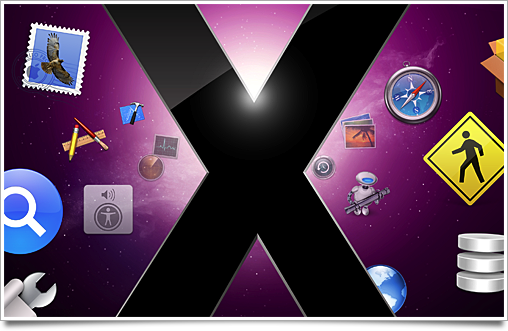
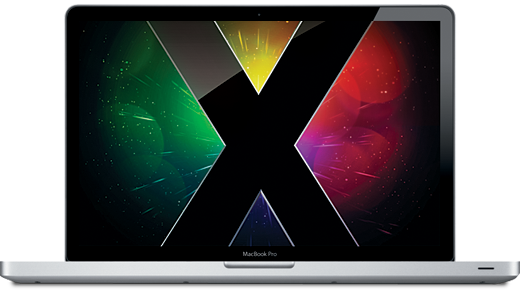
Since my office walls are awfully empty, I decided to design one of my favorite Mac OS X icons by Apple at 2 by 2 meters. Although the Photoshop file got awfully big (the original is rendered, but I redid it in Photoshop), it works pretty well as a wallpaper. Making it took about a day and a half (I haven’t worked on it ‘full-time’, as I’ve got client work too) I’ll post new pictures in this post next Tuesday when I expect the print to be put up in the office.

image.jpg

For now, check out the wallpaper version preview at Flickr.

Yummy February.

February 5, 2008 on 5:35 pm | In Apple, Icon Design, Personal Work

newicons.png

Feast your eyes on some icons yet to come. I’m almost literally breaking my teeth on adding details and perfecting a new icon aesthetic. More updates on several interesting February developments soon (before the end of the month).

Screening screens: why you don’t want to buy a Cinema Display (edited).

January 30, 2008 on 5:20 pm | In Apple, Ramblings

With getting a new Mac Pro, I was skimming the market for a good, affordable TFT screen that had some decent specs for designing. The most obvious choice that I see a lot with Mac Pro’s is the Apple Cinema Display, of course, the most iconic display Apple’s made to date. It’s also perhaps the least updated Apple product in the last 5 years, with only a few price drops in recent years.

I thought it would be nice to share my process of finding my perfect monitor; make a little comparison of the specs of all sorts of displays that would fit into my price range, regardless of brand or appearance, and draw my conclusions. My requirements are very simple; I’m not going to get a screen over € 700,-, it should be able to be reasonably good in delivering a full color gamut (high contrast and gamut), it has to be a TFT (LCD) screen, and it would be nice if it doesn’t look awful.

Edit: It’s wise to read the comments of this entry to get a balanced view of things. I am no expert on LCD panel types, and for a the type of panel the Cinema Display carries, it’s a very affordable display.

Continue reading Screening screens: why you don’t want to buy a Cinema Display (edited)….

The Origin of the Inimitable Icons.

January 24, 2008 on 10:16 pm | In Apple, Design, Graphics, Icon Design

I got some astonishing material in my hands today. It’s Apple’s material, and it is quite old - but I can assure you that the images are no less revealing and eye-opening. What I can’t figure out, for the life of me, is why Apple did not include this in the latest incarnation of their Human Interface Guidelines, as it is probably the best insight into the design of Aqua icons ever. Get a glimpse of the inception of Aqua inside.

Continue reading The Origin of the Inimitable Icons….

Apple updates Human Interface Guidelines.

January 17, 2008 on 1:56 am | In Apple, Interface Design, News

It’s nice to see Apple finally updating the canon of Mac inteface design - the HIG, or Human Interface Guidelines - that you can read or download in PDF form here. I particularly liked the revamped section on icons, including a ‘Creating Icons‘ (albeit very basic, gives a good idea of the process of adding realism to icons) and the ‘Designing Toolbar Icons‘ section. A good read either way, as it’s very low on jargon and very high on interesting gotchas.

The Airport Disk Debacle.

January 12, 2008 on 3:24 pm | In Apple, Ramblings

airdisk.pngI got a nice Airport Extreme router, with gigabit ethernet, 802.11n-draft wi-fi, and a shiny USB port. Since I also keep most of my stuff on my external USB drive, I figured it wouldn’t be a bad idea to hook up my movies and music to the router, so I could watch movies and listen to my music wherever I went, and regardless of the computer I was on. I set up the Airport, plugged in the disk, and walked back to my laptop.

Continue reading The Airport Disk Debacle….

For Spite.

November 12, 2007 on 1:21 pm | In Apple, News

Gedeon Maheux writes up how the ‘Marble of Doom’ website came to be.

Scary enough, I realized after reading this that ‘Marble of Doom’ slipped into my vocabulary after I had seen the website and my girlfriend laughed when I first used it out loud. Memes, anyone?

Apple opens up on Darwin 9.0.

November 7, 2007 on 12:47 am | In Apple, News, Open Source

Not so long after the release of Leopard, Apple has decided to hit us with the release of the source code of the kernel. The Darwin 9.0 sources are available for download (free ADC membership required) here.

Now there’s a thing we little know and love about Apple; an open-source rendering engine and kernel (and of coures, even more open-source projects slightly less significant than those).

iTunes 7.5 and Quicktime 7.3 released, iPhone firmware 1.1.2 photo gallery.

November 5, 2007 on 7:51 pm | In Apple, News, iPhone

Quicktime and iTunes were just updated over at Apple.com. The upgrade’s new features aren’t revealed, but I am sure it will address some changes necessary for the iPhone 1.1.2 firmware.

T3 got their hands on an iPhone carrying the 1.1.2 firmware and posted a picture gallery; if the images are in any way reliable, there’s not a lot of changes apart from International language support. A bit of a bummer, if you ask me, if the update would echo in just a few extra keyboards and plug up some exploits.

John Siracusa burns some paper folders.

October 29, 2007 on 1:12 pm | In Apple, Design, Icon Design, Interface Design

Poorly designed folder icons aren’t the end of the world, but it’s the context that’s so maddening. Here’s an interface element that maybe could have used some freshening up, but it was far from broken. Apple’s gone and made it worse in a way that’s obvious in seconds to anyone who’s ever given any thought to interface design. It boggles the mind. The rumor is that Jobs likes them. Great.

Some people on flickr apparently thought the same and quoted a recent article from me. I still think Apple is well aware of this; they went as far as to make alternative icons when you drag these ‘mundane’ folders into the 16-pixel only Finder sidebar;

sidebartononsidebar.png

I don’t think it was such a thing that ‘Steve liked them’; I think Apple’s engineers liked them in Coverflow, and much less so any other generic folder or icon. When you look around the entire interface, it’s obvious the focus is on Coverflow and large icon view; heck, Coverflow actually comes with a list view to help you drop the standard list view. What do you think?

Read the rest of Siracusa’s in-depth review of Leopard here

.

« Previous PageNext Page »