16 May
   Filed Under: Timezones   

I haven’t had a 1.0 release before so publicly, and I must say I am totally lyrical. The first few copies of Stealth have just gone out the door, so I can take a break customizing. The first day has been successful in sales and I want to thank everyone for buying or inquiring about it! Some feedback has been given about the site too, and for that, I am putting up a demo soon, and more information about what it does, why you would want it, and more. It’s up on several websites now, so AppUpdate and other ’smart’ package-receipt aware applications will pick up all updates in the future.

0-stealth.jpg

You guys are really supporting me. Thanks a lot for the hits, the visits, the input, and buying the product.

15 May
   Filed Under: Announcement, Timezones   

I think you’d better just go here and download the demo.

I am having issues setting up Kagi and my credit card, but as you can see on the buy page, you can email me if you’re dying to get in on this limited edition skin and personalized edition - we can surely send money over regular bank accounts or paypal before the credit card payments work. I’ll get this all settled in the next few days, as well as perhaps add a second demo with another theme. Give me some input, okay? And enjoy!

14 May
   Filed Under: Ramblings, Timezones   

greenshit.jpg

So, people, if you do make something that puts images on iPods in great, great quantities, then make sure you do it foolproof. Today, we can really virtually checksum files without computing cost to check their integrity. Hell, anyone who can make a shell script can verify if a copy operation succeeded by checking file size and attributes. Apparently, the iTunes team didn’t really deem this necessary (although you have full permission to flame me if you classdumped iTunes and found contrary evidence). The image above shows a, well, slightly recurring problem that can happen with the Photo sync of iTunes. It seems to be quite versed in producing corrupt images or even leaving some data of the old image in place, if the names were alike. I am going to dig deeper into this to see if I can make it reproducible.

I have tested this with GIF’s (which produce non-working images), PNG (native format of Timezones, makes these weird green bands seen above) and JPG’s, who create familiar ‘bolts’ artifacts and some very pretty colors and gradients that you haven’t bargained for. Perhaps, no, really, I might make an app that does this whole Photo syncing instead of iTunes. This is just too bad to be usable.
.

13 May
   Filed Under: Apple, Security   

Since it has been a bit silent on the security side of the blog lately, I have been working on some additions that are in line with the original nature of the blog. This week an interview with Johannes Tiefenbrunner, developer at Obdev in Austria, known for the premier Mac firewalling program Little Snitch, that protects you against potential trojans, outgoing connections (applications phoning home) and lately, even code injection. Obdev is also known for Launchbar, a very popular launcher application for OS X.
So, here’s the interview, in which I ask them about those cool features like code injection prevention, the future and past of Little Snitch (like Leopard) and even it’s icon. We also touch on OS X as a secure platform and it’s future.

1. Cocoia: Hello! You’re the developers behind the widely used security program for the Mac, Little Snitch. Could you tell a bit about your company?

Obdev: We kind of stepped into the Mac area via the side door: We’ve been developing software for the NeXT platform - e.g. LaunchBar actually started on the NeXT. When NeXT and Apple joined and the NeXT (OpenStep) technology became “Cocoa”, we were able to use our rich experience for the Mac.

We also develop for other *nix based platforms - our SMB network client Sharity supports several *nix flavors and our WebCMS WebYep, being PHP based, is cross platform anyway.

But we definitely can say that developing for the Mac is incomparably more joyful ;-).

2. Cocoia: Little Snitch has been among us for quite some while. What was the initial impulse to begin development on Little Snitch? How old is it now, exactly?

Obdev: The first version of Little Snitch was released in February 2003.

The idea of such application came up when we installed a new version of a well known application from one of the big software companies. There were rumors that this new version phones home, but nobody had definitive information since ordinary users weren’t able to verify this at that time. Curious as we are, we dove down into the Unix level of Mac OS X and by running some network sniffing tools found that the rumors were true.

We did not like the idea that any application can send data anywhere without our knowledge. The user should be informed and be able to decide. That’s why we created Little Snitch.

3.Cocoia: Have there been specifically hard points for you, like OS transitions and uneasy development challenges?

Obdev: Every Mac OS transition has the potential of requiring severe redesigns of Little Snitch - working in close contact with the lower levels of the operating system results in a greater dependency to that system’s implementation details.

But on the other hand this also makes it more challenging than the “usual” Mac OS application. Covering the whole area, from the kernel level up to the GUI, makes Little Snitch a very interesting project.

4. Cocoia: I have noticed that the latest versions of Little Snitch have improved protection from other, slightly related security issues like code injection. That’s quite a feat. What prompted the addition of this feature, and do you plan more extensive features like this in Little Snitch for the future versions?

Obdev: We have no plans to make Little Snitch into an “all-round security tool” with virus scanner, malware detection, firewall etc. - these things are not Little Snitch’s job. But whenever Little Snitch itself is endangered by some security problem, like it was by the code injection issue, we will protect it.

5. Cocoia: Little Snitch’s icon has had some criticism by bloggers and commenters on websites alike. What are your thoughts on this?

Obdev: To be honest: This is totally new to us. We actually have seen very positive response to Little Snitch’s icon - like on Starry Hope.
But this of course is a subject of taste. We currently do not have any plans to change the icon, but the upcoming Little Snitch 2 (currently in closed beta) will include improvements also on the visual side as well as in usability and functionality.

6. Cocoia: Is there a special version of Little Snitch for Leopard in the works? Is there anything you can divulge about this?

Obdev: With every new pre-release build of Leopard we adapt the current beta of Little Snitch 2. When Leopard is officially released, we will have a compatible version ready.

7. Cocoia: What are your thoughts, as a developer of premier security software for the Mac, as OS X’s security status? Do you think the future is grim, or do you have faith in the strength of a well-designed OS?

Obdev: We think that with Mac OS X Apple has a very good chance to offer the best and also most secure desktop operating system available. As always, there’s room for improvement, but beside other advantages, Apple has one big pro: They always had the guts to redesign core parts of their OS whenever they found a better solution instead of clubfooted dragging old designs into new OS version just for the sake of compatibility.

8. Cocoia: All right, thanks for the interview!

Obdev: Our pleasure - good bye!

I want to thank Johannes for this great interview and taking the time for having it.

12 May
   Filed Under: Timezones, War on Bad Design   

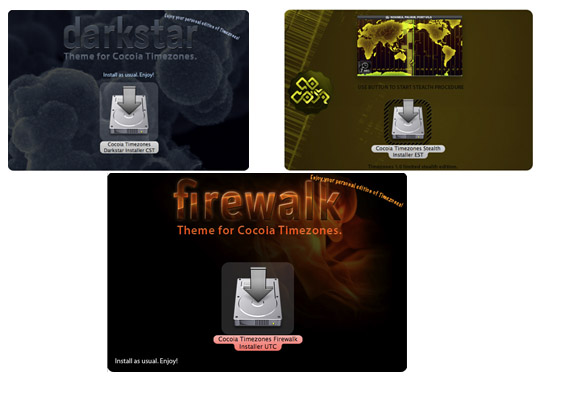
The War on Bad Design being started and all, I think our iPod friends should get armed. Like, to the teeth. Pretty themes and innovative functionality, easy to navigate. Now cheaper, for this little while, and you get some extra’s! Be prepared for release…

0-new.jpg

11 May
   Filed Under: Announcement, War on Bad Design   

0-war.jpg

When Cocoia reveals Cocoia Main, the world will know no mercy.

You are experiencing a deadly silence before the storm right now. The site, cocoia.com, will be home to Cocoia Labs, the portfolio of designs, various downloads and support pages, as well as your portal to all things Cocoia.

For anyone wondering what this all means past the hyping, I am rolling out some icon sets and helping some developers with new icons as well. For Leopard, we will need our trusty graphical friends to be big, very big. At least 512 pixels. So a lot of icons actually need redesigning. I see a chance to give all competition a run for their money. Let’s show OS X Tiger is still leaps forward of Linux. Let’s blow Vista’s oddball look out of the water. War has begun.

08 May
   Filed Under: Graphics, OpenGL, Ramblings   

Randleaf is still progressing, albeit slowly. I’ve taken the task of doing some rough semiotics on the produce of this little program, and I am almost done making a few categories with guidelines and ‘creation flags’ that really 99% of all generated images adhere to. Uh, I could say, Randleaf is going á la carte; it’s becoming increasingly simple to define what image you want to see coming out of it.

yay.jpg

I had proposed this analysis of Randleaf’s products to my Illustration teacher, and he accepted it as a free project, so that’s good - I can rarely ever make my personal work rhyme with my education; graphic design isn’t new media, after all, and not all media is fun to me (don’t ask me anything about video, I don’t really like it).

In the meantime, the blog’s uneasy silence is caused by the impending release of new blog styles, the Cocoia main site, and several personal projects including but not limited to improving the overall look of Mac OS X open-source utilities and my two (I’d almost say, make that three) apps. At the moment, you could say my day is getting a bit hectic with projects;

1. School work (obligatory illustrations, essays, etc.)
2. Timezones 1.0 (due May 15th)
3. CCC presentation(s) (due for submission before May 15th)
4. Daily build and troubleshoot of Praetorian and iSight Expert; I switch products as I feel like it, but admittedly, Praetorian is seeing a lot of attention as it’s data management and import had to be redone -again- when I discovered FreeRADIUS has raddb inconsistencies across versions.
5. Personal website work.
6. Other commissioned work I am not at liberty to discuss.
7. When my girlfriend’s lucky, personal work-outs for actual physique.

Busy? I feel at times, it kills me, I’ve had an incredible headache for two weeks now, which gets paralyzing at moments. Fortunately, my code is starting to make a lot more sense; I am really getting around the whole unit-testing paradigm and all my projects are seeing a lot of attention to details and cleanup. I strongly suspect the whole headache fuzz is mostly caused by a lack of rest, which I think I can do better with. Sometimes I can’t even grok my reference documents or get my mind around mentally sculpting concepts.

On a side note, the OS X spell-checker wanted to correct “FreeRADIUS” with “ferrari’s”. I suppose it has the same ring to it. I imagined actually writing an app that manages ferrari’s on your Mac, but that’s just too much fun to bear.

05 May
   Filed Under: Announcement, Timezones   

Okay, people, I am gearing up for the final release. I am taking ten days to do the necessary bugfixes and tweaks, and here is a preview of things to come (one of them being the very hot black theme) and the official release date announcement. Since there were also a few questions over at MacUpdate, I will answer them in this post as well.

infosheet.jpg


You can download the beta here for evaluation purposes. The final version will have a demo, but it will be somewhat restricted.

Questions:

Timezones has no clear purpose. It’s no world clock. It’s no world map. What is it?
A: Cocoia Timezones was made to navigate timezones and quickly find out what time it is where. There being no open API for iPod development, the world map is made ‘interactive’ by making a series of images you can scroll though. The ‘world clock’ terminology was a mess-up from my side, and I’m sorry for that.

Why does the installer ‘phone home’?
A: It doesn’t. If you were to carefully scrutinize it, you can see the installer is fetching the first image of the installation process - namely a how-to for the installation. After that, no more connections are made, and nothing else is transferred. The internet image was embedded to later be replaced by a notice that the beta has expired and is deprecated.

(insert feature that isn’t in timezones here) isn’t in Timezones. Why?
A: There is no open iPod API for developing software.

I hope this clears it all up a bit. I hope you are enjoying the beta and look forward to perhaps a small beta update and the final release.

05 May
   Filed Under: Ramblings   

Some people have asked me why I don’t want to start a truly open, public beta for my Mac apps (iSight Expert, Praetorian) like I opened up Timezones yesterday. After a few thousand downloads of your fresh beta product, you’ll realize just why.

I can count the messages giving input and bugs on one hand. It’s just sad to know that so many people, downloading and using it, simply cannot take the time or see that there is a definite amount of time (and thus, money), dedication, and love going into a ‘free’ product they can just go download. If there is a ‘download here!’ link, people won’t bother. If they’ll like it, a beta’s just as good as a free app. See the whole Xtorrent story. If they don’t, either because it doesn’t work properly to them or simply a matter of opinion, they will delete the file and forget about it. You’ll need a lot more exposure to get more and more people downloading, and I can only expect a bit more serious input after what? 10.000 downloads? 100.000? It’s hard to determine where the sweet point lies, but most certainly, it lies in selecting your own beta testers instead of just *anyone*.

Free downloads make people lazy. It’s the same with piracy. The notion of something being ‘out there’, on the internet, much rather makes it a product to consume and discard instead of evaluate. It’s become faceless. The products does not reflect the work behind it or the maker.

Please don’t feel guilty about downloading and using my product. But even the smallest bit of input is very welcome. More than you could imagine. A tiny, tiny reinforcement of the notion that I worked on this and put real effort into it is what I do it for. If you can say “I don’t enjoy this product, because…”, I’m more than just happy. If you come along again to tell me that you simply like it, and that’s it, even that is great to me. It’s a very, very little task you can do to show me that you care.

04 May
   Filed Under: Personal Work, Popular, Timezones   

I thought, go download your own and see if it works out for you. I got mail from Nano users willing to test too, so hey.

The beta of Cocoia Timezones is now public. Be sure to read the readme and follow installer instructions. It allows you to choose a different directory to install to (recommended).

release.jpg

Features excluded in this BETA version:

  • Personalised timezone overlay,
  • New 1.0 themes,
  • Map smooth motion.
  • This is not feature complete. Please test this for me, and give me feedback about bugs, inconsistencies, and suggestions at this address.

    Download now.