



03
Dec
Photoshop Icon Goodie
Category: Goodies, Icon Design, Personal Work
A quick replacement icon for Photoshop. Blue squares (or cubes) don’t really qualify as icons for me, and I’ve been going between replacement icons for too long. I just wanted something similar to the Apple-supplied developer tools’ icons, so here you go.
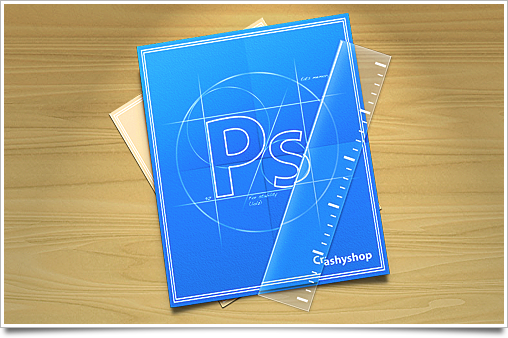
Grab the icon here:

As usual, I’d like you to use it for personal computer customization only. Not endorsed by Adobe Systems Inc. in any way.
WOW! I love it :D:D
Love the refraction on the rule, as ever, small details make all the difference, looks stunning!
Nice, the “Crashyshop” is a nice touch. Really digging the transparency of that ruler.
It looks really great at the size above, but it’s got too much fine detail: in my dock (at approximately 40×40 size) the circle and “Ps” letters are very indistinct, and even the ruler edges are not clear; so the end result is the icon looking like a messy angled blue rectangle.
Really awesome!! For sure using it :)
OMFG!! CrashyShop ! – So that is Photoshop CS is for.. :D
You might also enjoy the small scribbles on the blueprint paper itself ;)
Thanks! I really like this kind of replacement icons, simple and beautiful.
Featured on http://www.iconpaper.org
@Sebastiaan Heh, I didn’t read those scribbles at first. Well done!
nice icon :D
Featured on http://www.lgadesigns.com/blog/
thx.
Very nice. Any chance you want to make one for Fireworks too? :-)
Very nice, however as Andrew points out it gets kind of blurry in the smaller sizes: http://grab.by/XI1
Great icon (as always)
@Jonas, Andrew: It does get blurry at those sizes, but that was a compromise I was willing to take.
Very slick! Featured on Pixel Paradise!
I am clearly going to replace the existing icon with this one, so much better.
Love the “Crashyshop” at the bottom :)
Another cool idea would have been to do a feather instead of ruler as a tribute to the CS2 designs
Awesome. Except my Illustrator icon now looks painfully out of touch. :)
LEGENDARY!
Featured on.. ehm.. my dock :)
Pieter: made my day ;)
Featured in my mind.
I know how much PS crashes on you so I understand [and love] the “CrashyShop” at the bottom. Nice work here.
Sebastiaan is my God.
Great icon, way much better than Adobe’s standard icon which somehow looks ugly on dock. Only complain (well, no really) is that I use pretty small dock (aprox. 40-50px in height) and those “Ps” outlines start to disappear. Anything else — great, thanks for goodie. :)
thief! i so this icon on deviant art! you changed the photoshop with crashshop and a circle!
/sarcasm
This is brilliant, I wish you could make one that looks about the same, but in orange, for Illustrator…