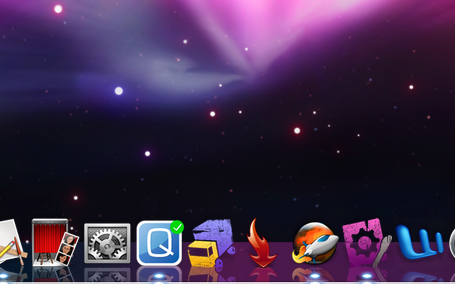
Since the release of Leopard, a huge movement has already sprung up to changeitslook. Check out this colorful glass surface (ugh, is that a truck crashing?).
Apparently, people are flocking to the new Dock as a means to customize OS X even more. I see a market for an app that does this, guys.
You can follow any responses to this entry through the RSS 2.0 feed.
Both comments and pings are currently closed.
5 Responses
1
Tiggar
The only thing I still can’t change is Finders Dock Icon. Do you also know a way how to change this?
Cheers!
2
sebastiaan
Tiggar, you might want to check out Panic’s Candybar for such ‘stubborn’ icons; this app makes it easier to apply (system) icons. There’s a free trial available over at panic.com.
3
Raven
I’m disappointed that all of us with docks on the side are left out of this modding fun. No matter what I try, the left-side dock stays stubbornly flat and smoked.
4
Raven
Also, what is that Q icon in your dock?
5
sebastiaan
@Raven; fortunately, this isn’t my Dock; I am very happy with my flat smoky look. I’ll inform around if there’s a possibility to have the glassy dock on the side.




The only thing I still can’t change is Finders Dock Icon. Do you also know a way how to change this?
Cheers!
Tiggar, you might want to check out Panic’s Candybar for such ‘stubborn’ icons; this app makes it easier to apply (system) icons. There’s a free trial available over at panic.com.
I’m disappointed that all of us with docks on the side are left out of this modding fun. No matter what I try, the left-side dock stays stubbornly flat and smoked.
Also, what is that Q icon in your dock?
@Raven; fortunately, this isn’t my Dock; I am very happy with my flat smoky look. I’ll inform around if there’s a possibility to have the glassy dock on the side.